Unlocking Public Google Drive
In the current times where collaboration and accessibility reign, Google Drive provides versatile features for users to access, store and share files with others, for professional or personal use. We’ll review in this article the benefits and best practices when accessing or creating public Google Drive archives.
Public Access on Google Drive
A “public” file or folder in Google Drive means that it has been set to be accessed by anyone on the internet with the link, regardless of whether they possess a Google account. This can be convenient when having to share a document of any kind stored in Google Drive, with a wide audience, or needing to share it quickly without having/wanting to grant individual access.
Risks and Considerations
Since anyone can view and download a public file or folder, it can pose a security concern by making confidential information available. Before making a file or folder public, ensure no sensitive information is in it. If you are sharing a document as part of your job, there is likely to be a security guideline provided by your company (if you work as an employee) that you can check. In addition, if the Google Account is managed by your company, there might be additional security safeguards in place to avoid sharing files with emails outside the organization, or outside of certain groups of users.
How to Make a File or Folder Public
1. Search for the file or folder in Google Drive
2. Hover over its name and right-click
3. Move over to the “Share” on the option menu and then click “Share” on the secondary menu
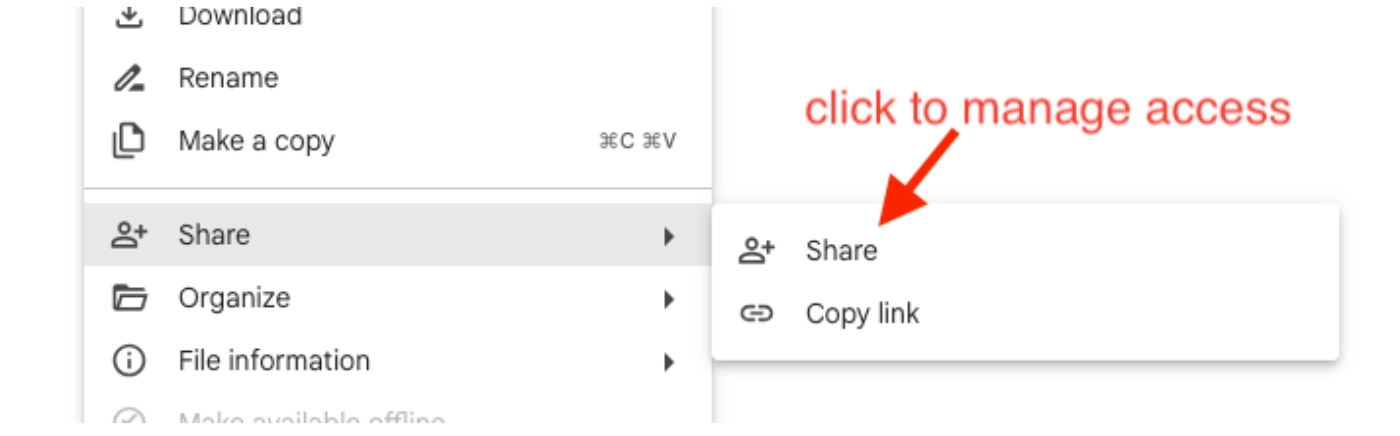
4. A pop-up window will open with different options. On the “General access” section click on the select combo and click on the option “Anyone with the link”
5. A new select combo will be shown on the pop-up window where you'll have the opportunity to select the level of access you want to grant to people accessing the file: they will be able to view it only, “Viewer”, view and comment, “Commenter”, or view, comment and edit, “Editor”.
6. Note: Finally, click on the “Copy link” button to have it copied to your clipboard and share it with any user you deem should access the file via email, messaging apps, or other communication channels
Notes
- The permissions over the file or folder change once you change the selected value on the combos (before clicking on the “Done” button on the pop-up window).
- Public docs may get indexed by search engines and therefore even if you share the link with specific users, it can show up in search results and be accessed by anyone that has the link.
- When making a folder a public folder, all its contents will be made public as well.
- For personal accounts, you can revert any given permission over a file or folder, as long as you are the owner of the file. Google accounts managed by companies or institutions might restrict the creation and edition of files and folders
Some Good Practices for Data Security when Public Sharing
- Descriptive Naming for files and folders: use clear and descriptive names to minimize the risk of confusion or misinterpretation of what the content is about
- Regularly Review Sharing Settings: Periodically review the sharing settings of your public files and folders to ensure they remain appropriate. Revoke access for any outdated or unnecessary links to prevent unauthorized access. You can create a recurring calendar event to help you remember this.
- Avoid Sharing Sensitive Information: Exercise caution when sharing sensitive or confidential information publicly. Consider alternative methods of sharing, such as restricted access or encrypted file sharing, for sensitive data.
Conclusion
Using Public files/folders in Google Drive can be powerful to share and collaborate over content, yet must be used with caution understanding the implications of it to avoid sharing sensitive data, following the best practices established by the industry and/or companies or institutions you might be part of.