NordVPN review: what it does, what it doesn't, and who it's for
Some links in this guide are affiliate links: if you buy through them, dedigger may earn a commission at no extra cost to you. Commissions do not decide what we include, and we also list options that pay us nothing.
NordVPN is one of the best-known VPN services, and one of the easiest to use on a phone. This NordVPN review looks at it from a privacy and security point of view: what a VPN actually protects you from, what it doesn't, how the Android app works, what its no-logs audits say, and whether it's worth paying for.
NordVPN at a glance
- Made by: Nord Security.
- Apps: Android, iPhone and iPad, Windows, macOS, Linux and Android TV, plus browser extensions for Chrome, Firefox and Edge.
- Devices per account: up to 10 at the same time.
- Protocols: NordLynx (built on WireGuard), OpenVPN, IKEv2/IPsec and NordWhisper.
- No-logs audits: PwC in 2018 and 2020, then Deloitte; the sixth assessment was published in February 2026.
- Free plan: no.
- Refund: 30 days on your first purchase from NordVPN's website.
Details as of October 2026. Check NordVPN's own site for the current plans and prices, which change often and vary by country.
What a VPN actually protects
A VPN (virtual private network) creates an encrypted tunnel between your device and a server run by the VPN company. Everything you do online goes through that tunnel. In practice, that gives you three things:
- Safety on public Wi-Fi. On the Wi-Fi at a café, a college campus, a hostel or an airport, other people on the same network, or whoever runs it, can't see or tamper with your traffic. This is the most useful reason to use a VPN for most people.
- Privacy from your network provider. Your mobile operator, internet provider or office network sees that you're connected to a VPN, but not which websites you visit.
- Your IP address stays private. The websites you open see the VPN server's IP address instead of yours, so they can't use it to estimate where you live.
What a VPN doesn't do
VPN marketing can make it sound like a magic shield. It isn't, and it's worth knowing the limits before you pay:
- It doesn't make you anonymous. If you're signed in to Google, Facebook or Instagram, they still know it's you, VPN or not.
- It doesn't protect your passwords. If you type your password into a fake login page, the VPN encrypts it on the way to the scammer. Strong, unique passwords and 2-Step Verification matter more.
- It doesn't replace updates. An outdated phone or browser is still vulnerable. Keep Android and your apps up to date.
- It doesn't hide your searches from your search engine. The search engine still receives everything you type into it.
That last point is why some people pair a VPN with a privacy-focused search engine. Our in-depth look at the Gibiru search engine shows what one of them does with your searches, and where its promises are hard to verify.
Using NordVPN on Android
Most of our readers browse on Android phones, so that's the app we look at here. The iPhone app works the same way.
- Install NordVPN from Google Play and sign in to your Nord account.
- Tap Quick Connect. The app picks a fast server near you.
- Android asks you once to allow a VPN connection. Accept it.
- When the bar at the top turns green and says Connected, your traffic is going through the VPN. Use Pause or Disconnect to turn it off.
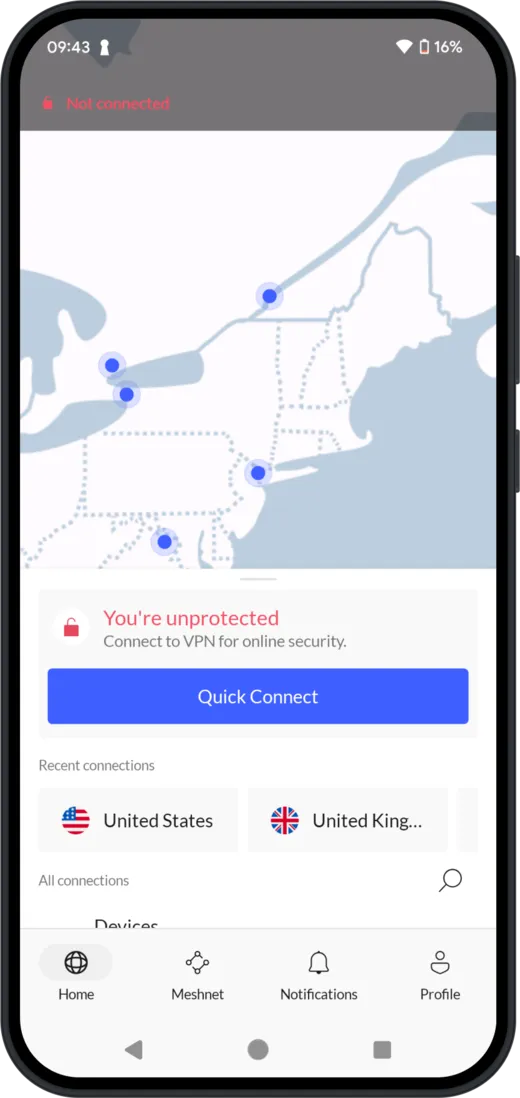
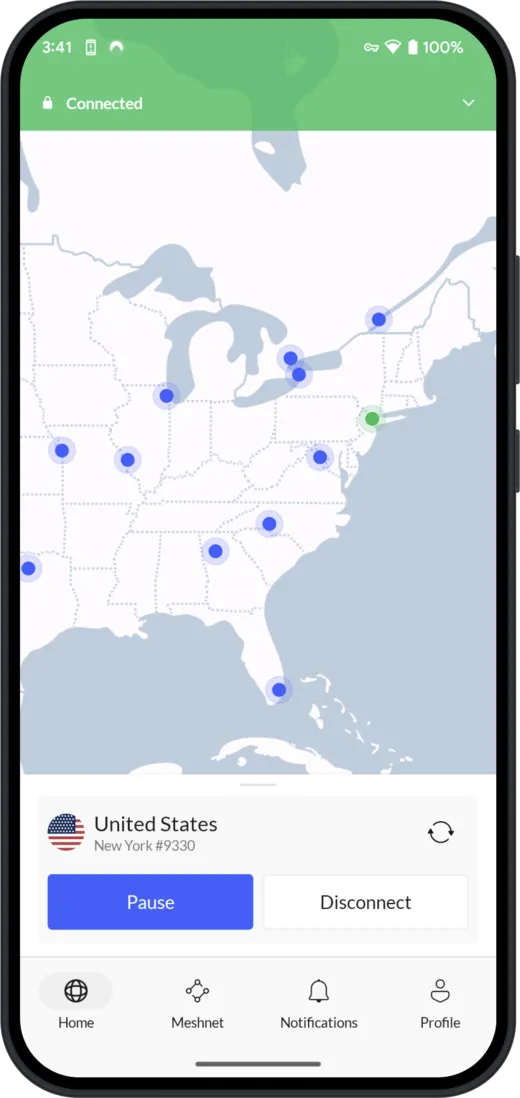
You can also choose a country from the list on the home screen, but for privacy and safety on public Wi-Fi the nearest server is usually the best choice: it's the fastest one, and where the server is doesn't change how well your traffic is encrypted.
Security features worth turning on
The app works with its default settings, but a few options in Settings make it noticeably safer:
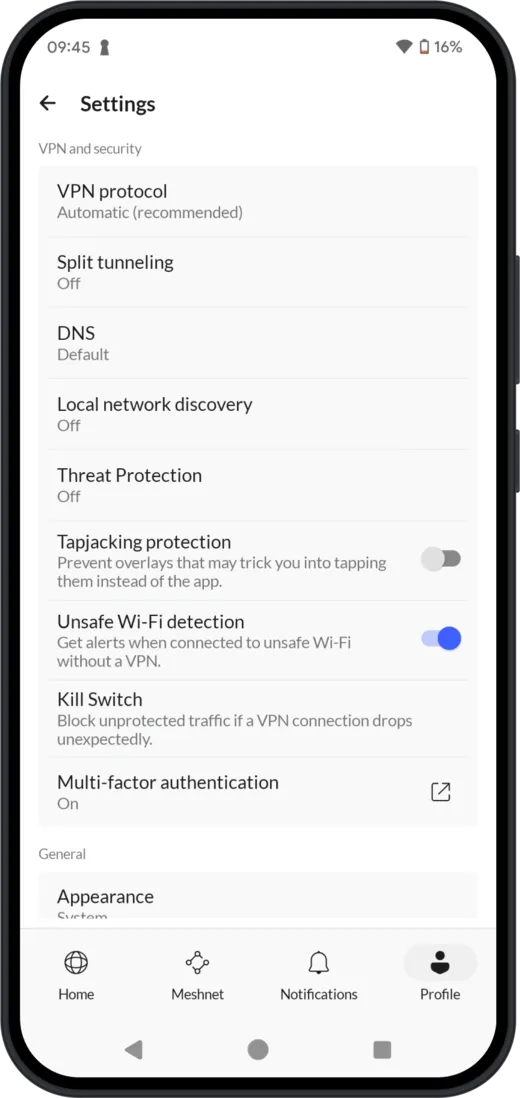
- Kill Switch. If the VPN connection drops, it blocks internet access until it's back, so nothing leaks out unprotected for those few seconds.
- Threat Protection. Blocks known malicious websites and trackers. On Windows and macOS, the fuller Threat Protection Pro also scans files for malware.
- Unsafe Wi-Fi detection. Warns you when you join an unsafe Wi-Fi network without the VPN on, which is exactly when you need it.
- Tapjacking protection. Stops other apps from drawing invisible overlays that trick you into tapping something you didn't mean to.
- Split tunneling. Lets chosen apps skip the VPN, which helps when a banking or payment app refuses to work over a VPN.
- Multi-factor authentication. Protects your Nord account itself with a second step at sign-in.
One more setting is on by default with the recommended protocol: NordLynx connections support post-quantum encryption across NordVPN's apps, designed to stay secure against future quantum computers. It doesn't apply to the other protocols.
Privacy: logs and audits
A VPN company can see a lot about its users, so its logging policy matters more than any feature. NordVPN says it doesn't log what you do online, and it has paid independent firms to check that claim several times: PwC in 2018 and 2020, then Deloitte. Deloitte's sixth assessment, carried out at the end of 2025, was published in February 2026 and concluded that NordVPN's systems were set up in line with its no-logs statement.
Two caveats keep this honest. An assessment checks systems at a point in time, based partly on what the company shows the auditors. And NordVPN has had a security incident: in 2018, an intruder got into one server at a data center it rented in Finland, which NordVPN disclosed in 2019 and was criticized for not reporting sooner. Since then it has been audited more often than most competitors, which is a reasonable sign, but no audit is a guarantee.
Price and refunds
NordVPN has no free plan. Paid plans are billed monthly, yearly or every two years, and the longer plans cost much less per month. Higher tiers add other Nord Security products to the VPN. Prices vary by country and by season, so compare the plans on NordVPN's site rather than relying on a number in an article.
The refund rules depend on where you pay:
- On NordVPN's website: you can get a refund within 30 days of your first purchase. Renewals aren't covered.
- On Google Play: Google gives you 48 hours to request a refund through your Play account; after that, you contact NordVPN's support.
- On the App Store: refunds are handled by Apple, not NordVPN.
Who NordVPN is for
NordVPN makes sense if:
- you often use public or shared Wi-Fi, at college, at work, in cafés or while travelling;
- you want an app that's simple enough to use every day, with one-tap connect on your phone;
- a no-logs policy checked by an outside auditor matters to you;
- you want to cover the whole family: one account works on up to 10 devices.
You can probably skip it if you only browse at home on your own Wi-Fi and don't mind your provider knowing which sites you visit, or if you need a free service.
A VPN is one layer, not the whole plan
The habits that protect you most are still the boring ones: unique passwords, 2-Step Verification on your important accounts, and updates installed promptly. A password manager such as NordPass takes care of the first one. Our guide to public vs private cloud storage covers the same thinking for the files you keep online.
If you want that extra layer for your connection, NordVPN is one of the most audited and easiest-to-use options available.

How we reviewed NordVPN
This review is based on NordVPN's apps and documentation, its support pages and the published results of its independent audits. We didn't run our own speed tests. The app screenshots were provided by NordVPN. dedigger earns a commission if you buy through the links in this article; that doesn't change what we write about it.
Frequently asked questions
Is NordVPN free?
No. NordVPN only has paid plans. Purchases on its website come with a 30-day refund on the first payment.
How many devices can I use NordVPN on?
Up to 10 at the same time with one account, on any mix of phones, tablets and computers.
Does NordVPN keep logs?
NordVPN says it doesn't log your online activity, and Deloitte has assessed that claim several times, most recently in an assessment published in February 2026.
Does a VPN slow down my phone?
A little, because your traffic takes an extra step through the VPN server. Connecting to a nearby server with the NordLynx protocol keeps the difference small for everyday browsing.