
Proton Drive free storage: how to get 5 GB and what you get
Some links in this guide are affiliate links: if you buy through them, dedigger may earn a commission at no extra cost to you. Commissions do not decide what we include, and we also list options that pay us nothing.
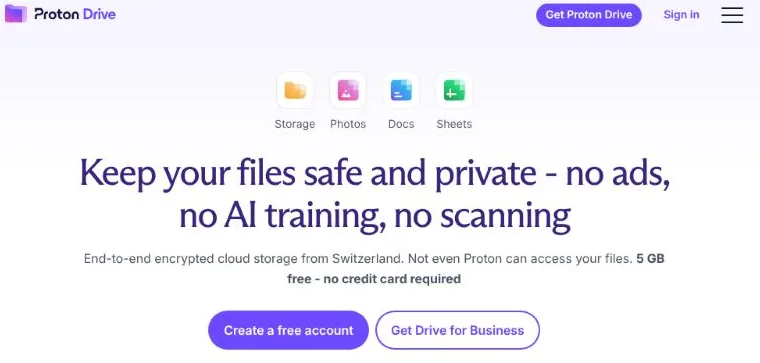
Proton Drive free storage is 5 GB, as of November 2026. A new free account starts with 2 GB, and Proton adds the other 3 GB once you complete three short tasks within your first 30 days. Every file is end-to-end encrypted, which means Proton itself can't open it. Below you'll find how to unlock the full 5 GB, what the free plan includes, what the paid plans cost and how it compares with the 15 GB you get from Google.
What Proton Drive is
Proton Drive is a cloud storage service from Proton, the Swiss company behind Proton Mail and Proton VPN. It works like other cloud drives: you upload files and folders, open them from any device and share them with a link. The difference is how the files are protected.
With most cloud services, your files are encrypted on the company's servers, but the company holds the keys. With Proton Drive, files are encrypted on your device before they're uploaded, and only you hold the key that unlocks them. That is what end-to-end encryption means. Proton's support pages say file contents, file names and folder names are all encrypted this way. A few details, such as the file size, are not.
If the difference between "encrypted" and "private" is new to you, our guide to public vs private cloud storage explains it step by step.
How to unlock 5 GB of Proton Drive free storage
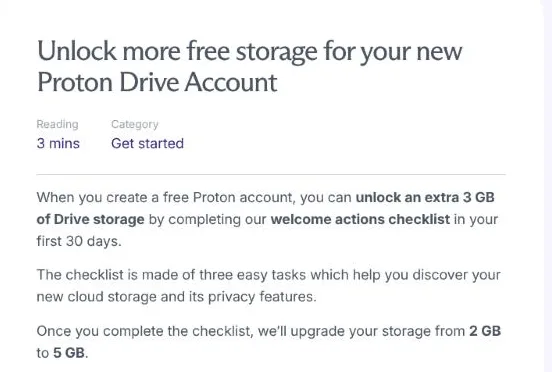
Proton calls this the welcome actions checklist. According to its help center, all free Proton Drive accounts are eligible, as long as you finish the checklist within 30 days of creating your account. When you're done, your storage goes from 2 GB to 5 GB and Proton sends you an email to confirm it.
- Add a file or a folder. On the web, open drive.proton.me, click + New and choose Upload file or Upload folder, or drag files into My files. Uploading from the Android app counts too.
- Create a shareable link. Open the Share options of any file and turn on the Public link toggle. You don't have to send the link to anyone; creating it is enough. Use a harmless test file for this, not a personal document, and turn the link off afterwards if you don't need it.
- Add recovery methods. Go to Settings and then Recovery, and add at least one account recovery method and one data recovery method.
Don't skip the third step, even if the extra storage doesn't matter to you. Because only you hold the key to your files, Proton can't reset your way back into them the way Google can. If you forget your password and have no data recovery method set up, your files can stay locked for good. A recovery phrase or recovery file, saved somewhere safe and offline, is your spare key.
If the checklist doesn't appear right away, Proton says the offer is still active. And if you already completed it in the past, your allowance should already show 5 GB.
Is the storage shared with Proton Mail?
Not on the free plan. Proton's help pages describe separate free allowances: up to 5 GB for Drive and up to 1 GB for Mail (Mail starts at 500 MB and rises to 1 GB after its own get-started tasks). Google works differently: its free 15 GB is one pool shared by Gmail, Drive and Google Photos, so a full inbox eats into your Drive space.
What the free plan includes
As of November 2026, Proton's pricing page lists these features for the free plan, with no credit card needed:
- 5 GB for files, photos and documents, once you complete the checklist.
- End-to-end encryption for everything you store.
- Online documents and spreadsheets. Proton Docs and Proton Sheets let you write and edit inside Drive, without downloading a separate app.
- Apps for every device. There are Android and iPhone apps, desktop apps for Windows and macOS, a command-line tool and the web app. On a computer without a desktop app, the web app in your browser does the job.
- Photo backup. The mobile apps can back up the photos on your phone, though 5 GB fills up fast if you shoot a lot of video.
- Sharing links with extra controls. You can protect a link with a password and give it an expiry date. Free accounts can create up to three sharing links with Editor access.
Proton also says it will always offer a free plan, which matters if you're choosing a place to keep files for years.
Proton Drive paid plans and prices
If 5 GB isn't enough, these are the main personal plans on Proton's Drive pricing page, as of November 2026. Prices are shown in US dollars, euros or Swiss francs; Proton doesn't list prices in rupees, so your card will be charged in one of those currencies and your bank may add a foreign transaction fee.
| Plan | Storage | Yearly price (USD) |
|---|---|---|
| Proton Free | 5 GB | Free |
| Drive Plus | 200 GB | US$29.88 for the first 12 months, then US$47.88 a year |
| Proton Unlimited | 500 GB, plus Mail, Calendar, Pass and VPN | US$77.88 for the first 12 months, then US$119.88 a year |
| Proton Duo | 2 TB for up to 2 people | US$179.88 a year |
| Proton Family | 3 TB for up to 6 people | See Proton's pricing page |
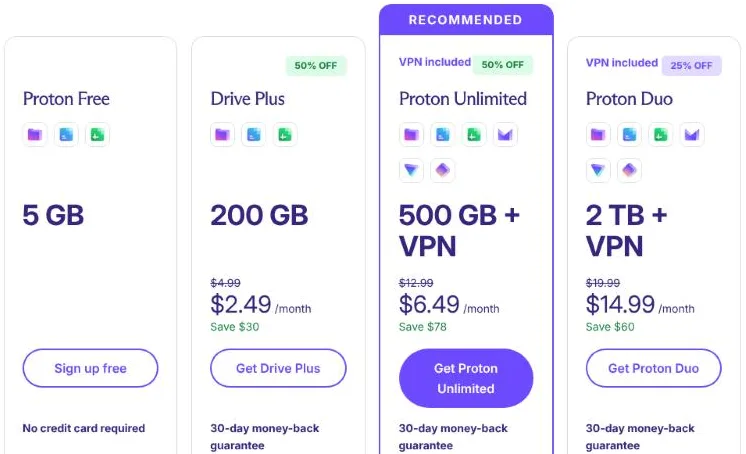
Notice the first-year discounts: the renewal price is higher, so budget for that before you pay. Paid plans come with a 30-day money-back guarantee, and Drive Plus keeps previous versions of your files for up to 10 years. Paying customers also earn a yearly storage bonus, which for Drive Plus is 4 GB more for each year you pay.
You can check current prices in your currency on Proton's pricing page, or start with a free account from Proton Drive and upgrade only if you run out of space.
Proton Drive vs Google Drive's free 15 GB
Google gives you three times as much free space, so why would anyone pick Proton? It depends on what you're storing.
| Proton Drive Free | Google Drive Free | |
|---|---|---|
| Free storage | Up to 5 GB, for Drive only | 15 GB, shared with Gmail and Google Photos |
| Who can read your files | Only you and the people you share with | You, people you share with, and Google's systems |
| Forgotten password | Files need your recovery method | Google can help you get back in |
| Office tools | Proton Docs and Sheets | Google Docs, Sheets, Slides and Forms |
| Working with others | Basic sharing and editing | Very strong: comments, live editing, add-ons |
| Used by schools and offices | Rarely | Very often |
For group projects, class assignments and anything your teacher or office expects in Google Docs, Google Drive is the practical choice. For documents you'd hate to see in the wrong hands, such as ID card scans, marksheets, bank statements, medical reports or signed contracts, Proton Drive's encryption is worth more than the extra gigabytes.
Many people use both: Google Drive for everyday work and a free Proton account as a private locker for the few files that really matter. If your Google account is close to its limit, our guide to Google Drive storage full shows how to win space back first, and moving your most sensitive scans to Proton frees a little more.
Honest pros and cons
What's good
- Strong privacy by default, with nothing to switch on.
- A real free plan with no card and no trial that runs out.
- Password-protected links with an expiry date, handy for sending documents.
- Apps for Android, iPhone, Windows and macOS.
What's not so good
- 5 GB is small, especially for phone photos and videos.
- The extra 3 GB needs the checklist in your first 30 days.
- If you lose your password and your recovery methods, your files may be gone for good.
- Docs and Sheets are simpler than Google's, and fewer people around you will use them.
- Paid plans are billed in dollars, euros or francs, not rupees.
Proton is one of several services built around privacy. If you'd like to compare it with pCloud, MEGA, Internxt and others before deciding, see our roundup of Google Drive alternatives, which lists each one's free plan side by side.
Frequently asked questions
How much free storage does Proton Drive give?
Up to 5 GB, as of November 2026. A new account starts with 2 GB and gets 3 GB more after you add a file, create a shareable link and set up recovery methods within your first 30 days.
Can I get more than 5 GB without paying?
Proton's help pages don't describe a way to go past 5 GB on the free plan. The yearly storage bonuses only apply while you pay for a plan, so for more space you'd need Drive Plus or a bigger plan.
Is Proton Drive really private?
Your files, file names and folder names are encrypted on your device before upload, so Proton says it can't read them. Privacy still depends on you: anyone with an open sharing link can see that file, so add a password and an expiry date to links for personal documents.
Does Proton Drive work on Android?
Yes. There's a Proton Drive app on Google Play that lets you upload files, back up photos and open your documents. Files you upload from the app count toward the checklist too.
One search tip a week, plus our new guides: follow dedigger on WhatsApp.