
Google Drive video editor: trim and edit videos with Google Vids
Some links in this guide are affiliate links: if you buy through them, dedigger may earn a commission at no extra cost to you. Commissions do not decide what we include, and we also list options that pay us nothing.
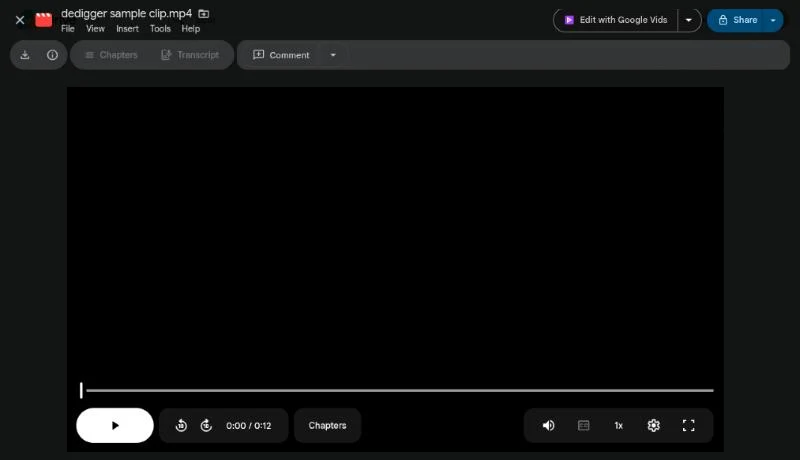
Google Drive now has a video editor built in. When you preview a video in Drive on a computer, an Edit with Google Vids button sends it to Google Vids, Google's browser video editor, where you can trim it, add text and music and download the result as an MP4. This guide shows how the Google Drive video editor works, what it costs and what to do on an Android phone, where it doesn't work yet.
What the Google Drive video editor is
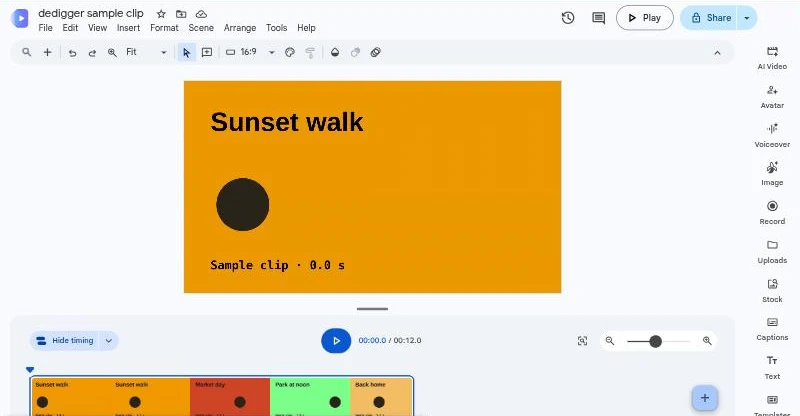
Drive itself still only stores and plays videos. The editing happens in Google Vids, an editor that runs in your browser like Google Docs or Slides. The Edit with Google Vids button in Drive's video preview is simply a shortcut: it creates a new Vids project with your video already placed as the first scene.
That has two consequences worth knowing before you start:
- Your original video is not changed. You edit a new project, and you save the result as a new file. If you don't like your edit, the original is still in Drive.
- You need a computer. Google's help pages say you can watch finished videos made with Vids on a phone, but you can't edit or comment on them there.
Google's help page for Vids says basic Vids features are available with a Google Account, and that for work or school accounts, the administrator decides whether Vids is turned on. When the Drive shortcut launched in 2025, Google announced it for paid work accounts and the button was called Open. As of November 2026, it shows up on free personal accounts as Edit with Google Vids. If you don't see it, you can still start a project at vids.new and upload the video yourself.
How to edit a video in Google Drive, step by step
Use a recent version of Chrome, Firefox or, on Windows, Microsoft Edge. Google says editing doesn't work in Safari at the moment.
- Go to drive.google.com and sign in.
- Double-click the video to open the preview.
- Click Edit with Google Vids at the top right. A new Vids project opens with your video as the first scene.
- Make your edits (see the next section).
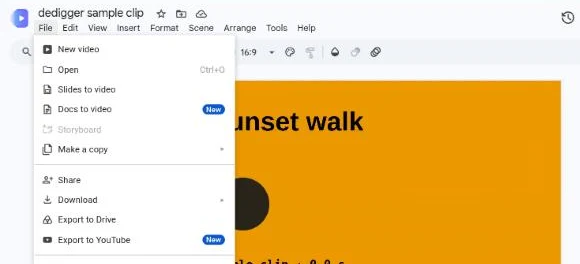
- Click File > Download > Download as MP4 to get a normal video file you can send on WhatsApp or upload anywhere.
As of November 2026, Google lists MP4, QuickTime (MOV), OGG and WebM as the formats you can open this way, with a limit of 35 minutes and 4 GB per clip. Most phone videos are MP4 or MOV, so they work. If a long screen recording or lecture won't open, split it or trim it first.
What you can do in Vids
Vids is not a full studio editor, but it covers the edits most people need for a class project, a short reel or a family video:
- Trim. Cut the parts you don't need from the start and end of a clip.
- Add text. Titles, captions and labels, with shapes and lines if you want a simple layout.
- Add music and sound. Use Vids' stock music and sound effects, or upload your own audio.
- Combine clips. Add more videos, images or GIFs as new scenes and put transitions between them.
- Record. Record yourself, your screen or both, which is handy for presentations and tutorials.
- Start from a template. Vids has designed templates if you'd rather not lay out each scene yourself.
Keep the finished video short. Google's Vids help page gives a maximum length of 30 minutes for a video, so a full lecture or event recording won't fit in one project.
Sharing the result
You have three ways to share what you made. You can share the Vids project itself from the Share button, with Viewer, Commenter or Editor access, just like a Google Doc. You can download it as an MP4. Or you can choose File > Export to Drive to save an MP4 back to Drive, which is the easiest option if you plan to send the link to a teacher or a client.
Does it use your Google storage?
Yes, in practice. Because the editor never overwrites the original, every MP4 you save to Drive is a second copy of your video, and it counts toward the free 15 GB you share across Google Drive, Gmail and Google Photos. A few edits of a long phone video can use more space than you expect.
After you export, check the new file and delete older versions you no longer need. If you're already close to the limit, our guide to Google Drive storage full shows how to find the biggest files in your account and free up space. Long videos you want to keep but not edit can also live outside Google, for example in pCloud, so they don't eat into your 15 GB.
Is the Google Drive video editor free?
The basic editing tools in Vids, such as trimming, text, music and recording, are part of a regular Google Account. What is limited are the AI features, which use Gemini. Google's page on Gemini features in Google Vids lists these limits for personal accounts as of November 2026:
| AI feature | Free personal account | Google AI Pro |
|---|---|---|
| Monthly credits | 50 credits | Larger limits per feature |
| Help me create (a first draft from a prompt) | 5 credits per use | Unlimited |
| AI voice-over | 1 credit per voice-over | Unlimited |
| Image generation and editing | 1 credit per image | 30 per month |
| AI avatars | 6 per month, preset avatars only | 25 per month |
| AI video clips | 60 seconds per month | 500 seconds per month |
Credits reset at midnight Pacific Time on the first day of each month and don't roll over. Google also says these limits and features may change, so check that page before you plan a project around them. You'll see many different numbers in news articles, because the limits have changed several times.
Language matters too. Google says many AI features in Vids only work in English for now. AI voice-overs support more languages, including Hindi and Tamil, but the prompt-based tools are mostly English. The basic editing tools work in any language, because your text is just text.
Editing videos on an Android phone
As of November 2026, there's no Vids app for Android, and Google says you can't edit in Vids from a phone or tablet. The Drive app on Android plays your videos but has no editing button. If your phone is the only device you have, use one of these free options instead:
- Google Photos. Open the video in the Photos app and tap Edit to trim it, crop it or adjust the colours. It's already on most Android phones.
- Canva. The free plan includes a video editor in the browser and in the Android app, with templates for reels, stories and school presentations, plus text and music.
Both save a new video on your phone. You can then upload it to Drive from the Drive app with the + button and share it from there.
Only edit videos you have the right to use
The Edit with Google Vids button works on videos in your own Drive and on videos someone shared with you with access to them. Edit your own recordings, or videos a classmate or colleague shared with you for a project. If you add music or clips from elsewhere, use your own, Vids' stock library or material whose owner lets you reuse it. If you're looking for public files that their owners chose to share, such as templates or class notes, dedigger searches public Google Drive files.
Frequently asked questions
Does Google Drive have a video editor?
Yes, through Google Vids. On a computer, preview a video in Drive and click Edit with Google Vids. Drive itself, and the Drive app on Android, only play videos.
Does editing in Vids change my original video?
No. Vids creates a new project, and you save the edited version as a new MP4. The original stays in Drive until you delete it.
Is Google Vids free for personal accounts?
The basic editing tools are available with a Google Account. AI features use a monthly allowance of credits on free accounts, and paid Google AI plans get higher limits, as of November 2026.
Can I use the Google Drive video editor on my phone?
Not yet. You can watch finished Vids videos on a phone, but editing needs a computer. On Android, Google Photos or Canva can trim and edit videos for free.
One search tip a week, plus our new guides: follow dedigger on WhatsApp.