
Digital footprint: what it is and how to check your own
Some links in this guide are affiliate links: if you buy through them, dedigger may earn a commission at no extra cost to you. Commissions do not decide what we include, and we also list options that pay us nothing.
Your digital footprint is the trail of information you leave online: the accounts you open, the photos and comments you post, and the data that apps and websites collect about you without you typing anything. You can't erase it completely, but you can see what it contains and make it much smaller. This guide explains the two kinds of footprint, shows you how to check your own in about 20 minutes and lists the steps that shrink it.
What a digital footprint is
Think of walking on a beach. Some marks you make on purpose, like writing your name in the sand. Others you leave just by walking. Online it works the same way, and the two kinds have names.
- Active footprint: what you share yourself. Your profiles, posts, reviews, comments, the CV you uploaded to a job site, the photo in your WhatsApp profile, a form you filled in.
- Passive footprint: what is collected about you without you noticing. The websites you visit, your approximate location from your IP address, the cookies and trackers that build an advertising profile, the location history on your phone, and the data that other people post about you, such as a group photo with your name tagged.
Both kinds add up. A single detail is usually harmless, but many details joined together can say where you study or work, what time you leave home and who your family is.
Why your digital footprint matters
- Scams get more convincing. A fraudster who knows your college, your bank and your mother's name can write a message that sounds real. Most targeted scams start with information that was already public.
- Old accounts don't disappear. A forgotten shopping or gaming account still holds your email, sometimes your phone number and address. If that site is breached years later, your details leak with it.
- Data is sold. Data brokers collect information from many sources, build profiles and sell them, mostly for advertising. They are most active in the United States, but the apps on your phone feed similar systems everywhere.
- People look you up. Colleges, employers and even a future in-law may search your name. What they find shapes their first impression.
How to check your own digital footprint
Checking your own footprint is a small open-source intelligence (OSINT) exercise: you collect what anyone can see about you, using only public tools. Set aside 20 minutes and write down what you find as you go. Do this only for yourself, never to look someone else up. That is the line between protecting your privacy and invading someone else's, and our OSINT tools page follows the same rule.
1. Search your name the way a stranger would
Open a private or incognito window, so the results aren't shaped by your own account, and search your full name in quotes, for example "Priya Nair". Then add your city, your college or your company: "Priya Nair" Pune. Look at the first two pages of results and at the Images tab. Note every page that shows something you didn't expect.
2. Search your email address and phone number
Search your main email address in quotes, then your phone number in the formats people write it, with and without the country code. If they appear on a page, find out how: an old forum profile, a public document, a business listing you forgot about.
3. Search your profile photo
Your profile picture often travels further than your name. Run a reverse image search on Google with the photo you use on WhatsApp, Instagram or LinkedIn. It shows where else that picture appears, including accounts you forgot and, sometimes, fake profiles using your face.
4. Check whether your email was in a data breach
Go to Have I Been Pwned, a free service run by security researcher Troy Hunt, and enter your own email address. It lists the known breaches that included that address and what kind of data was exposed, never the passwords themselves. For every site on the list, change the password, and change it anywhere else you used the same one.
5. Find your forgotten accounts
Search your inbox for words like welcome, verify your email and confirm your account. Each result is a service you signed up for. Make a list of the ones you no longer use. Also check Sign in with Google under your Google account's third-party connections, which shows every app and website that has access to your account.
6. Look at what is collected quietly
Open My Activity in your Google account to see your saved searches, YouTube history and location history, and review which apps on your phone have access to your location, contacts and photos in Settings > Apps or Settings > Privacy. This is your passive footprint, the part you never typed.
A paid shortcut: NordVPN's digital footprint report
If you'd rather not do all of this by hand, some security services now automate it. NordVPN has added a digital footprint report to Dark Web Monitor, a feature of its paid plans. You choose an email address you've added to Dark Web Monitor, and the tool uses OSINT to look for personal details linked to it across the web. NordVPN's feature page says the report can include an exposure summary, a risk score, a list of the online profiles it found, including forgotten ones, recent activity and step-by-step advice on reducing your exposure. It also says it doesn't store, share or sell your personal information (as of November 2026).
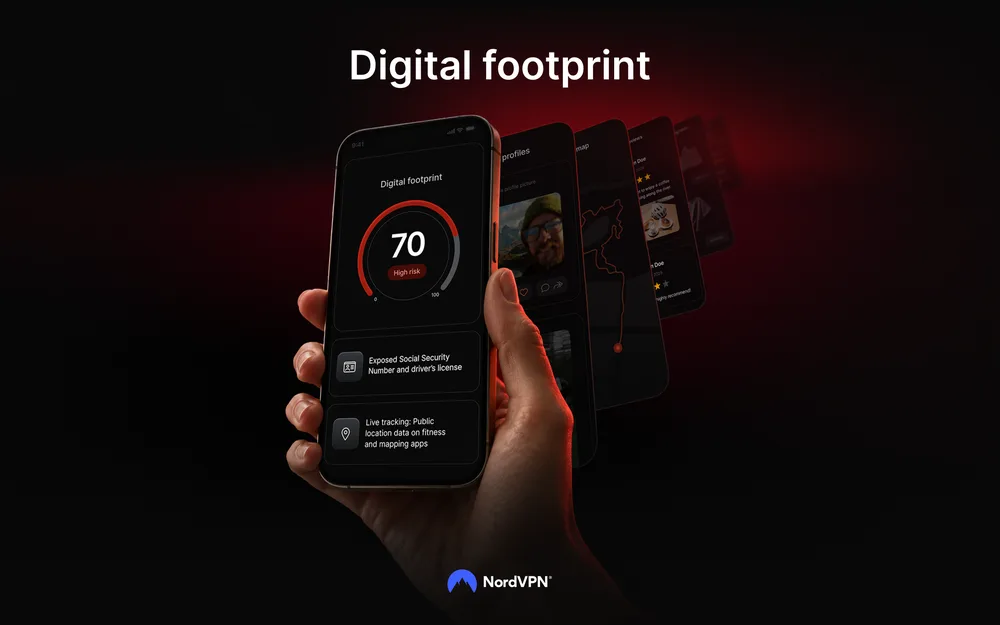
It doesn't do anything you can't do yourself with the steps above, but it saves time and keeps watching after the first check. If you only want to see your footprint once, the free steps are enough. If you'd like ongoing alerts and also want a VPN, our NordVPN review explains what the rest of the subscription covers.
How to shrink your digital footprint
- Delete accounts you don't use. Start with the list from step 5. Most services have a Delete account option in their settings; if not, search the site's help pages for "delete account". Deleting is better than leaving an account empty.
- Lock down the accounts you keep. Set social profiles to private where it makes sense, hide your phone number and email from your profile, and turn off "let people find me by phone number" options.
- Ask websites to remove your details. If a page shows your phone number or address, contact the site owner and ask them to take it down. Google's Results about you tool lets you request the removal of search results that show your contact details, where it's available in your country. Removing a result from Google doesn't delete the page itself.
- Clean your photos before you share them. Photos can carry the exact place where they were taken. Our photo metadata remover strips that information in your browser, without uploading the picture.
- Use unique passwords and two-step verification. Breached passwords are the main way old leaks turn into stolen accounts. A different password for every site, saved in a password manager, stops one breach from opening the others.
- Repeat the check every few months. Footprints grow quietly. A short check twice a year keeps surprises small.
Common mistakes
- Searching while signed in. Google personalises results, so you may see a cleaner picture than a stranger would. Use a private window.
- Forgetting other people's posts. Group photos, wedding albums and school pages can name you. Ask friends to untag you or remove details if something bothers you.
- Deleting the wrong thing first. Before you close an old email address, move important accounts to your current one, or you may lock yourself out.
- Expecting zero. Some information is meant to be public, like a professional profile. The goal is a footprint you chose, not an empty one.
A practice exercise
Take 20 minutes this week and do a self-audit:
- Write down your name, main email address, phone number and the photo you use most.
- Run steps 1 to 4 above and note every result you didn't expect.
- Pick the three findings that worry you most: an old account, a public phone number, a breach.
- Fix one of them today, and put the other two on your calendar.
That's the same routine an investigator follows, turned around to protect you instead of to find someone.
Frequently asked questions
Can I delete my digital footprint completely?
No. Copies of old pages, other people's posts and data held by companies can't all be removed. You can delete your own accounts, ask sites and search engines to remove your details and limit what you share from now on, which makes your footprint much smaller.
Is checking my digital footprint safe?
Yes, as long as you use reputable tools and only check your own details. Services like Have I Been Pwned show breach names, not passwords. Be careful with sites that ask for lots of personal information before showing you anything.
What is the difference between an active and a passive digital footprint?
An active footprint is what you share on purpose, such as posts and profiles. A passive footprint is collected without you noticing, such as browsing data, location history and tracking cookies.
One search tip a week, plus our new guides: follow dedigger on WhatsApp.